Run Debian or Kali on your Android phone. No root.

dracxterm opens straight to a shell. When you want more, it installs a full Linux distro inside its own storage, and version 1.1.0 adds claw: an assistant you can chat with and put to work in the same terminal.

  • Android 7.0 and newer
  • ARM64 and x86_64
  • Free and open source, GPL-3.0
  • No ads, no account
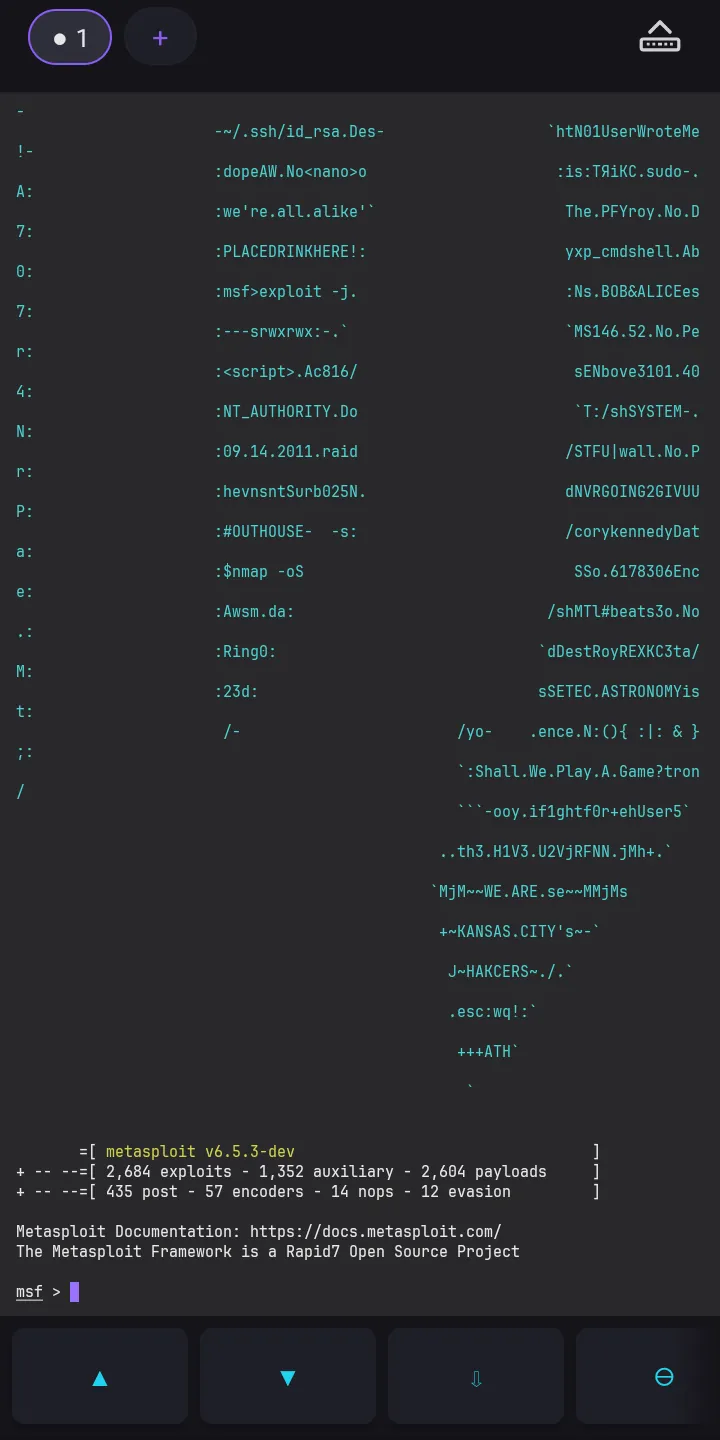
The Metasploit Framework console (msfconsole) running in dracxterm on Kali Linux on an Android phone

New in 1.1.0: ask claw, right in the terminal

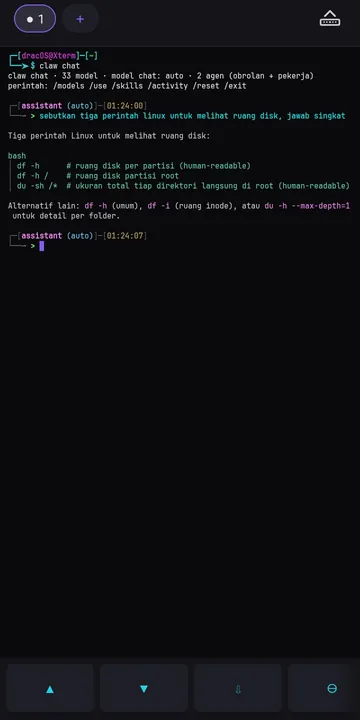
Type claw chat in an installed distro and write what you need in plain words. The answer lands in the same terminal, and while the model works the screen tells you what it is doing, such as which file it is writing.

┌─[dracOS@Xterm]─[~]
└─➤$ claw chat
claw chat · 33 model · model chat: auto · 2 agen (obrolan + pekerja)
perintah: /models /use /skills /activity /reset /exit

┌[assistant (auto)]─[01:24:00]
└─ > sebutkan tiga perintah linux untuk melihat ruang disk, jawab singkat

Tiga perintah Linux untuk melihat ruang disk:

  df -h      # ruang disk per partisi (human-readable)
  df -h /    # ruang disk partisi root
  du -sh /*  # ukuran total tiap direktori langsung di root

Alternatif lain: df -h (umum), df -i (ruang inode), atau du -h --max-depth=1 untuk detail per folder.

A real session, recorded on 3 October 2026 on an Android 15 phone running dracxterm 1.1.0. The question, in Indonesian, asks for three commands that show disk space.

  • No account to create

    claw talks to free model services that need no sign-up: LLM7, Kilo Gateway, Pollinations, OVHcloud AI Endpoints and OpenCode Zen. When one model is busy it moves to another. On our test phone it had 33 models to pick from.

  • You decide what it may touch

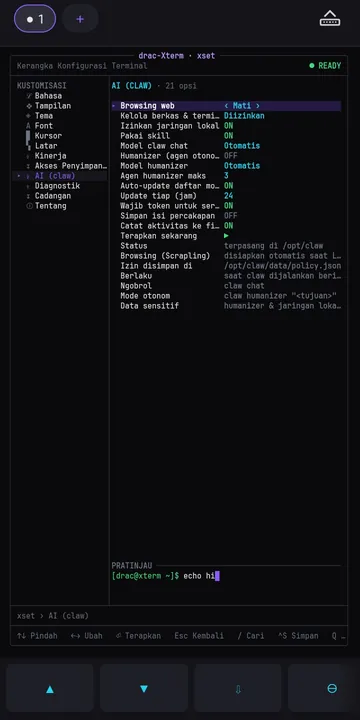
    xset claw controls whether claw may open web pages, read and change files and run commands, reach your local network, or use skills. Files and commands start switched off, and opening a page asks first.

  • Humanizer mode for bigger goals

    claw humanizer "goal" splits a goal across several agents and keeps working until you switch it off. A monitor tab opens beside your work so you can watch what they do.

  • Know where your words go

    What you type to claw is sent to those model services. Keep passwords and personal data out of the chat.

A real terminal first, a full Linux system when you need it

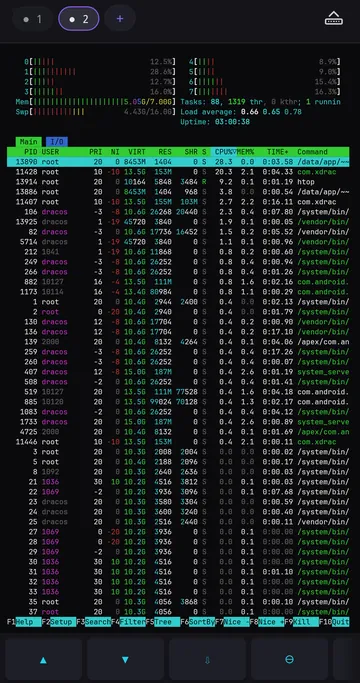
Full-screen programs such as nano, vim and htop draw the way they do on a computer. Linux runs through a rootless engine that ships inside the APK, so there is nothing else to install.

Debian and Kali without rooting Android

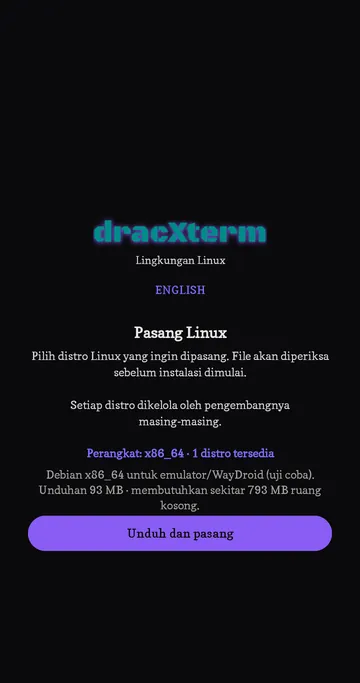
Pick a distro on first launch. Each download is checked against a SHA-256 fingerprint stored in the app before anything is unpacked, then sudo, apt and dpkg work as usual.

Distributions in the catalogue
DistroDownloadInstalled
Debian 13 (trixie) arm6435 MB400 MB
Kali Linux Nano arm64198 MB1.0 GB
Kali Linux Minimal arm64137 MB1.0 GB
Kali Linux Full arm641.8 GB9.5 GB
Debian 13 (trixie) x86_6489 MBabout 700 MB

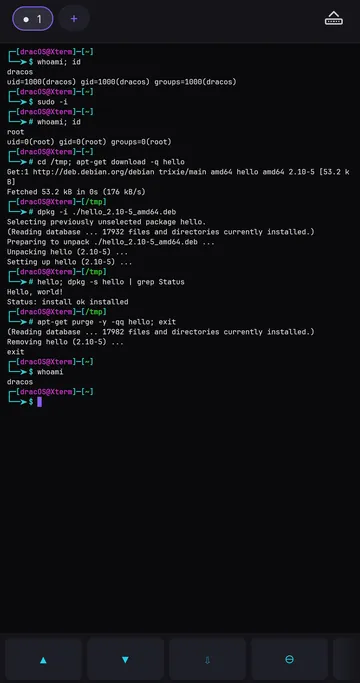
You log in as the normal user dracos. sudo -i gives a root shell that only exists inside the app.

Private by default

No ads, analytics, trackers or account, and nothing is sent to the developer.

The app goes online for three things. It downloads the distro you choose, sets up Python and Scrapling so claw can open web pages (you can switch that off), and sends your claw messages to a model service.

Phone storage access is never requested at launch. Turn it on in xset and it appears at ~/sdcard.

Read the privacy policy for 1.1.0

Built for real command-line work

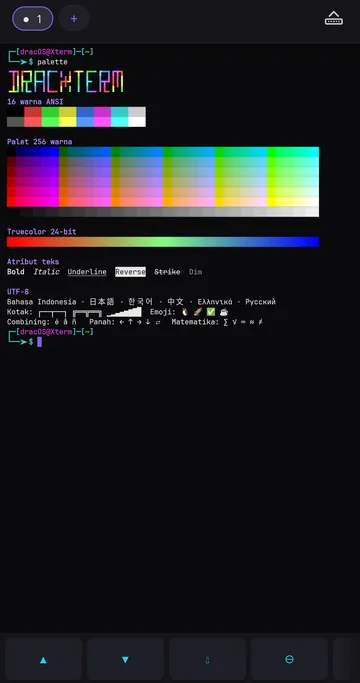
Truecolor, UTF-8 with CJK, mouse support for htop and mc, and a hardware keyboard that sends Ctrl, Alt, Shift and F1 to F12. You can scroll back and read while a program keeps printing.

Five workspaces

Each one keeps its own shell, directory and history. Swipe to switch. Sessions keep running when you leave the app.

Settings drawn inside the terminal, in six languages

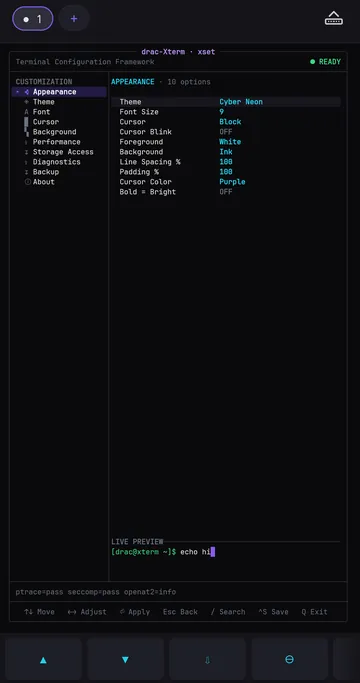
Type xset for themes, fonts, cursor, scrollback, storage access, claw permissions and diagnostics. Changes show up as you make them, and Back closes the panel.

  • Indonesia
  • English
  • 中文
  • Tiếng Việt
  • Русский
  • हिन्दी

Kali tools that used to fail now run

msfconsole opens the Metasploit Framework, sudo nmap scans, sudo stops warning about the host name, and date follows the phone's clock.
Screens from real phones

Scroll sideways. Every image is a screenshot of the app, cropped to the app area.

The Metasploit console (msfconsole) running in dracxterm on Kali Linux
Metasploit's msfconsole on Kali, no root.
claw chat answering a question in dracxterm
claw chat, new in 1.1.0.
The AI (claw) page in xset, listing what claw is allowed to do
The AI (claw) permissions page in xset.
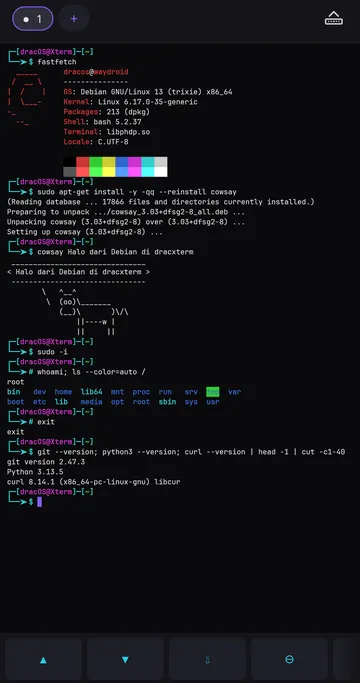
Debian 13 running fastfetch and apt commands inside dracxterm
Debian 13 with apt, git, Python and curl.
Distribution picker showing images that match the phone's processor
Pick a distro that matches your phone.
sudo -i root shell installing a .deb package with dpkg
A root shell and a .deb package installed with dpkg.
htop running full screen in a second workspace
htop in a second workspace.
ANSI colours, truecolor, emoji and CJK text rendered in dracxterm
Truecolor and full UTF-8.
xset appearance page with theme, font and cursor settings
Theme, font and cursor in xset.

Download, check, install

Every release has one APK for both ARM64 and x86_64, plus a SHA-256 file next to it.

  1. Download the APK

    From GitHub Releases or the SourceForge mirror.

  2. Check the file

    Compare it with the .sha256 file so you know it arrived intact.

  3. Install it

    Open the APK on the phone and allow installs from that app, or use adb. Installing over 1.0.6 keeps your distro and home folder.

# after downloading both files
$ sha256sum -c dracxterm-1.1.0-vc7-release.apk.sha256
dracxterm-1.1.0-vc7-release.apk: OK
$ adb install -r dracxterm-1.1.0-vc7-release.apk
Success

# then, inside the app, after a distro is installed
$ claw chat

Questions people ask

Does dracxterm need root?

No. Linux runs inside the app's own storage through a rootless engine. The root account you see inside the distro is simulated and only applies there.

Which phones can run dracxterm?

Android 7.0 or newer on a 64-bit ARM (arm64-v8a) or x86_64 processor, which covers most phones plus emulators, WayDroid and ChromeOS. 32-bit devices are not supported.

Can I run Kali Linux on Android with dracxterm?

Yes. Kali Nano, Kali Minimal and Kali Full are in the catalogue for ARM64. Kali Full needs about 9.5 GB once installed. nmap works with connect scans; options that need raw sockets, such as -sS and -O, are not available.

Is the claw assistant free? Do I need an API key?

claw uses free model services that work without an account, so no key is needed. If you have a key for Groq, OpenRouter, Google AI Studio, Cerebras or NVIDIA, set it (for example GROQ_API_KEY) and those models join the pool. Free services can be busy or change without notice.

What data leaves my phone?

There are no analytics, ads or trackers, and nothing is sent to the developer. The app goes online to download the distro you pick and to set up Python and Scrapling for claw's web browsing, which you can switch off in xset claw. When you use claw, your messages go to a model service. Details are in the privacy policy.

Can I update from 1.0.6 without losing my files?

Yes. Version 1.1.0 is signed with the same key, so it installs over 1.0.6 and keeps your distro and home folder.

Put a Linux command line and an assistant on your phone.